
Welcome to our Dovico Timesheet Summer Release 2026 update.
With summer comes warm temperatures, trips to the beach, hiking, and Bar-B-Qs. Here at Dovico things are really cooking. Let’s take a look at what’s coming in our release on September 9th.
Task Details – Activity Feed
As shown in the following image, we’ve made some improvements to the Task Details tab in the My Timesheet view. In the new Activity Feed section, your team can now leave comments on tasks.
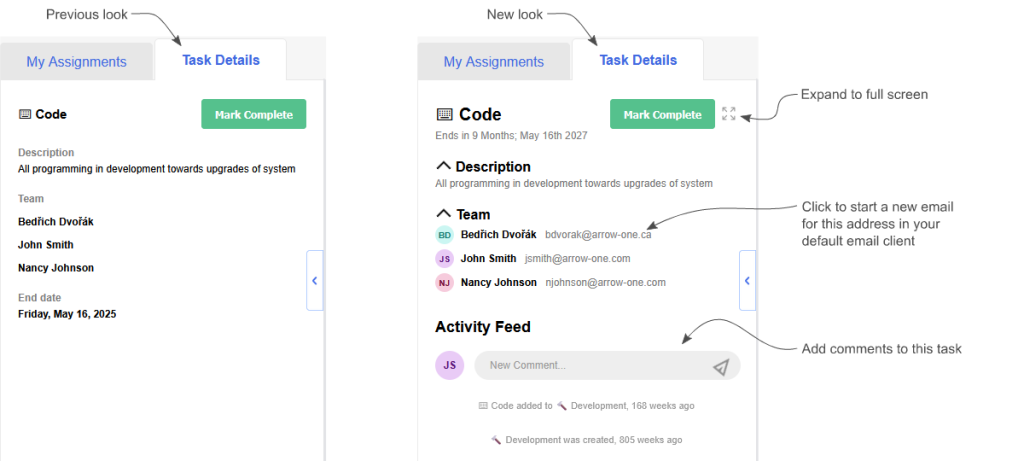
Also, the email addresses of your team members are now shown. When the email address is clicked on, it will open up your default email client.
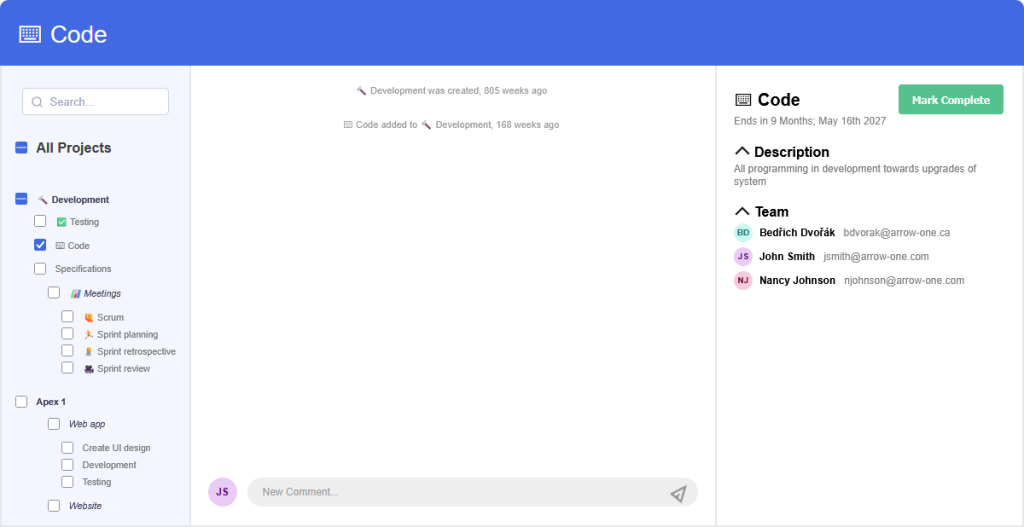
If you click on the new expand icon that’s to the right of the Mark Complete/Done button, you’ll be transported to a full-screen view as shown in the following image. This view allows you to see the activity of multiple tasks at once.
Stay tuned because more improvements are planned for the Task Details tab and Activity Feed.
Update on the AI Report Assistant Beta
We’ve been beta testing our AI Report Assistant with 15 Dovico Timesheet customers to validate the experience in real-world environments.
We’ve received positive feedback on the overall concept and an appreciation for the natural language interaction, accurate responses, detailed summaries & explanations, and export capabilities.
As with anything, there’s usually room for improvement and this is no exception. While accuracy is currently high, we’re going to continue refining it. We’re also going to work on improving response times, add better handling around ambiguous requests, and polish some edge cases around names and dates for example.
Aside from working on the improvements mentioned, we are also preparing the AI Reporting for broader availability.
We want to thank all of our beta testers for your time. This feedback is invaluable as we determine priorities and future development. You are helping shape Dovico’s AI direction.
Bulk Task Updates
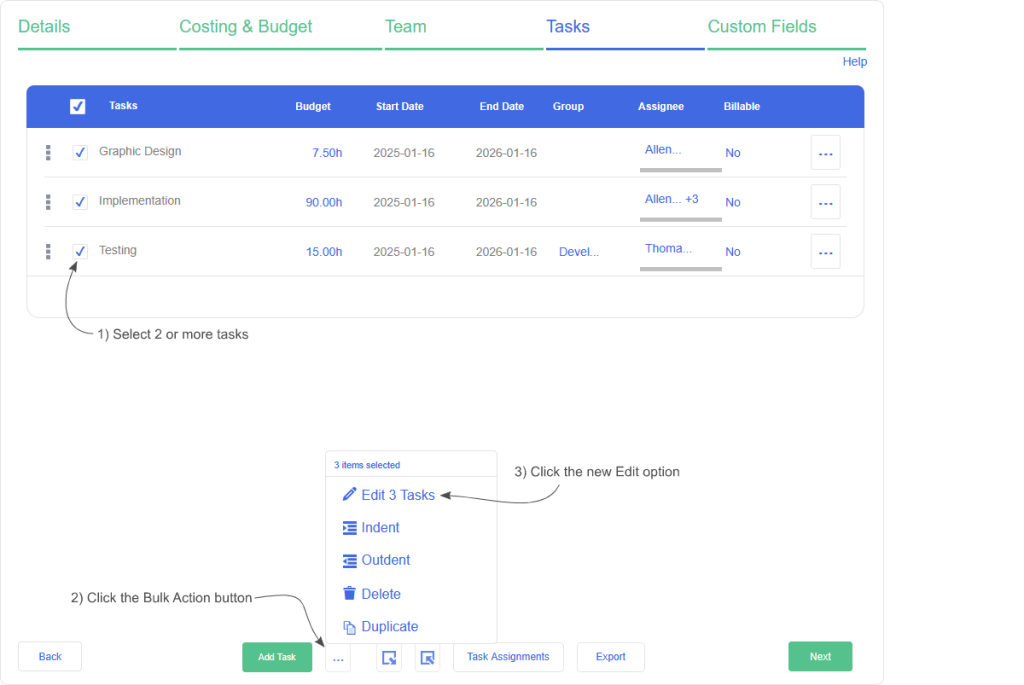
When editing a project, if you’ve ever needed to adjust task properties for multiple tasks, like if they’re billable or not for example, you may have found the process a little tedious. Up until now, adjusting the properties for multiple tasks required editing each task individually.
Now, as shown in the following image, if you select multiple tasks, the context menu that becomes visible at the bottom of the form allows you to edit the selected tasks all at once:
The task dialog, as shown in the following image, then allows you to adjust some of the properties for the selected tasks:
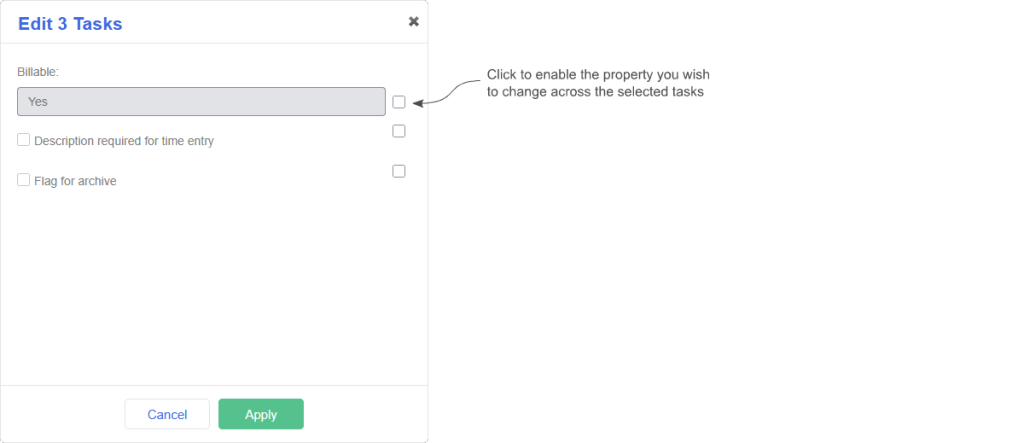
Because you may only want to adjust certain fields for the selected tasks, the property will only be adjusted if you check the checkbox for it on the right.
API Documentation
We’ve rebuilt the API documentation for version 7 calls. Now, instead of seeing information that includes both XML and JSON, you can choose which format you’re working with to help you focus on what matters as shown in the following image.
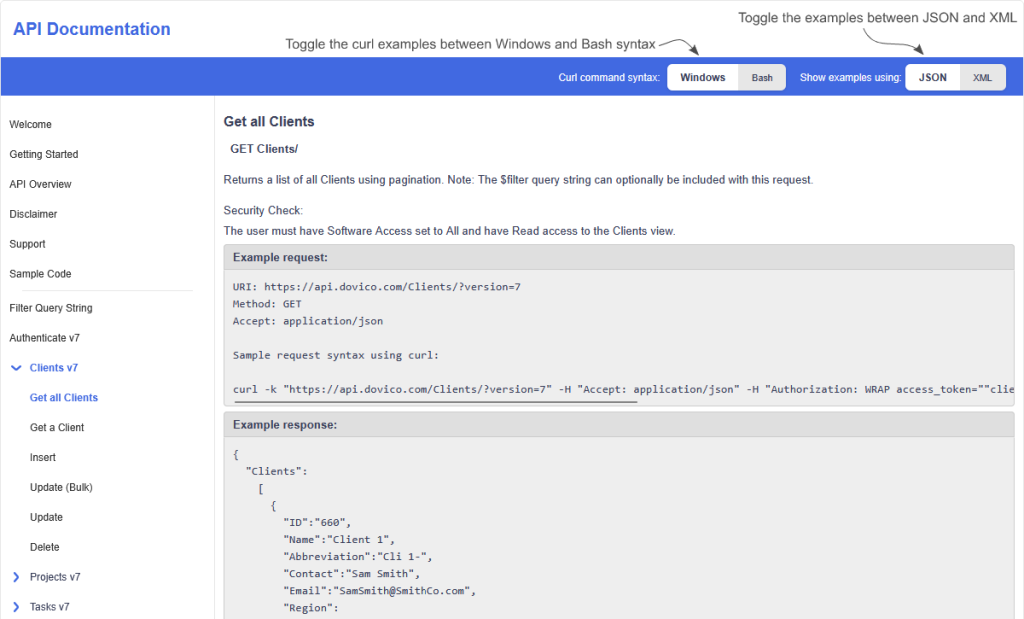
The API examples show the requests using a tool called curl. Curl can be used on many operating systems including Windows, macOS, and Linux but, up until now, the examples used the syntax needed for Windows. This caused problems for people who copied the example and tried to run it on non-Windows machines.
Now, you can toggle the examples to show the curl calls using Bash syntax.
The new documentation is now within Timesheet itself and can be accessed from the API tab of the Company view as shown in the following image:
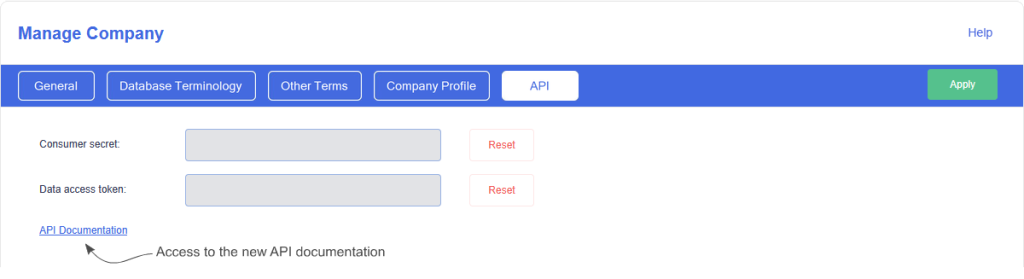
Currently only version 7 documentation has been migrated but we will work on migrating the older versions with every quarterly release. For now, if you’re using the new documentation and need to see the older calls, a link exists to bring you to the existing documentation on our website: https://timesheet.dovico.com/developer/API_doc/index.htm#t=API_Calls_v7%2FGroups_v7.htm
Once all versions of the API have been migrated to the new system, the documentation on the website will be replaced with the new system.
In Conclusion
As always, we hope these Dovico Timesheet changes make things a little smoother, allowing you to get more done with less effort.
We value your input. If there is something you’d like to see in Timesheet, or something you feel could be improved, let us know: timesheet.dovico.com/contact
You can also reach out to our support team if you have any questions or concerns: timesheet.dovico.com/support
New to Dovico Timesheet?
These updates are part of our ongoing focus to help teams track time accurately, manage projects more easily, and stay focused on the work that matters.
If you’re not yet using Dovico Timesheet, check out our pricing page where you can sign up for a free 30-day trial to see if it’s right for you: timesheet.dovico.com/pricing
Gerard Gallant,
CIO of Dovico Software
Stay informed!
For more information on how and when regular maintenance is performed on Dovico servers, please check out our Maintenance Window Policy.
Please let us know if you are experiencing any issues with our software or have suggestions about how we can improve your experience by contacting our friendly support team.
Please reach out with any questions or feedback!