
Welcome to our Dovico Timesheet Winter Release 2026 update.
Winter is sometimes seen negatively because of the cold temperatures and restricted mobility from snow storms or icy roads. Thankfully, like with most things, there’s a positive aspect too. Winter also brings a time of rest, renewal, and preparation for growth.
Let’s step inside and shake off the cold as we take a look at the accomplishments since our last release and what you can expect on February 17th.
Dovico Timesheet mobile app release
In our Fall Release article, I mentioned that an update for the mobile version of Timesheet (mobile browser, Android, Apple) was coming soon. I’m pleased to announce that the mobile release happened on January 13th.
The following are some of the improvements that were part of the update:
Single Sign-On (SSO)
If your company has SSO enabled, the mobile app will now work with your setup the same way the main login page does if using a desktop browser.
Reporting
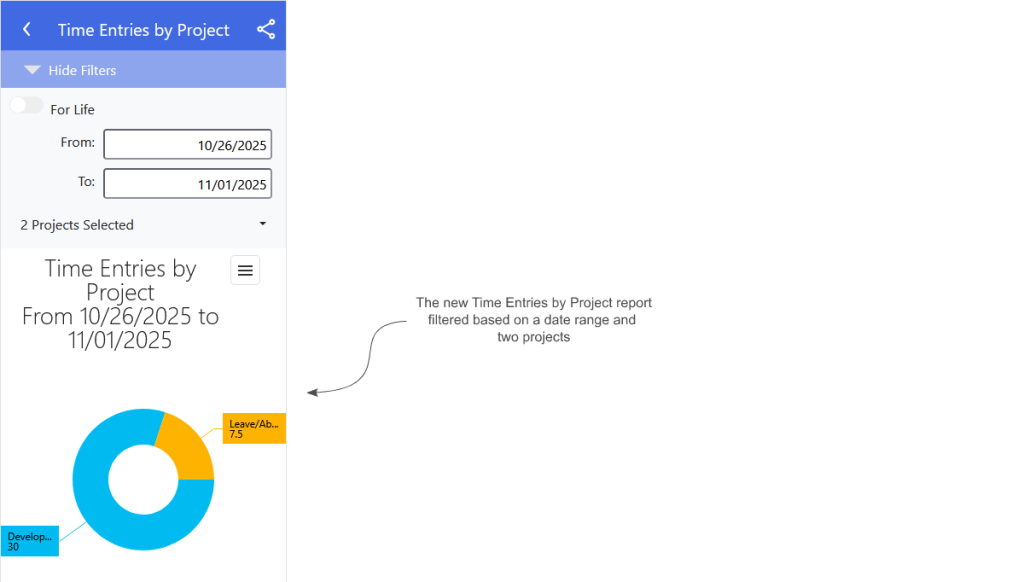
As shown in the following image, the mobile app now supports running a Time Entries by Project report. The report’s filtering allows you to choose a date range as well as one or more projects to customize the results.
Employee creation
If you’re a Dovico Timesheet user (not on version 13), you’ll now see an Employees option in your menu that brings you to the new Employees section, as shown in the following image.
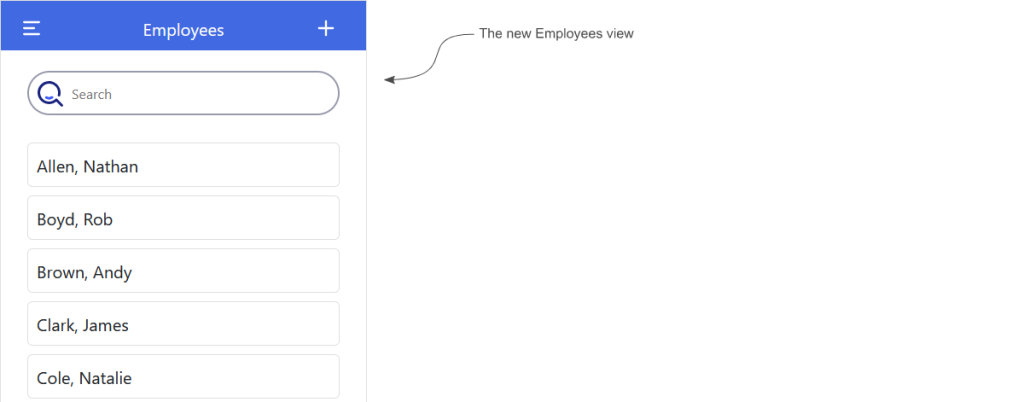
In the new employee view, you can create employees and edit their basic information (first name, last name, and email address).
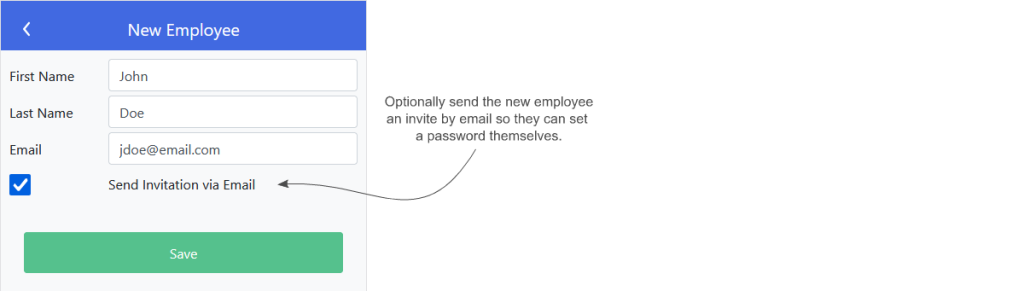
As shown in the following image, when you create an employee, an option will exist to optionally send that employee an invitation by email. When the employee receives the email, they’ll be given a link that allows them to define a password so they can log in.
One of our goals for 2025 was the continued improvement of the mobile experience and to bring feature parity with Dovico Timesheet itself. There are still some upcoming changes that we’ll be releasing in the near future to that end but we hope you find the latest updates make your workflow smoother.
Task Management coming to Pro plans
As part of our Spring 2025 Release, we introduced some task management features like the Task Details tab in the My Timesheet view. With these new features, as shown in the following image, your employees can easily see task details like who’s working on the project with them.
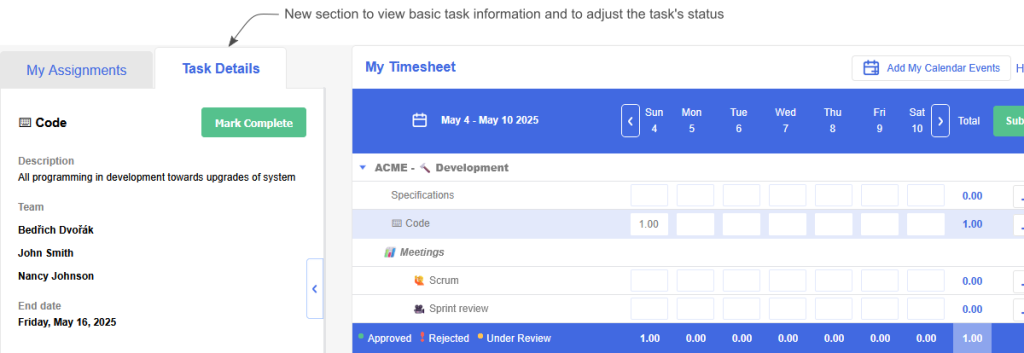
The Task Details tab also has a Mark Complete button that makes it easier for a manager to see the status of tasks from the Projects view as shown in the following image:
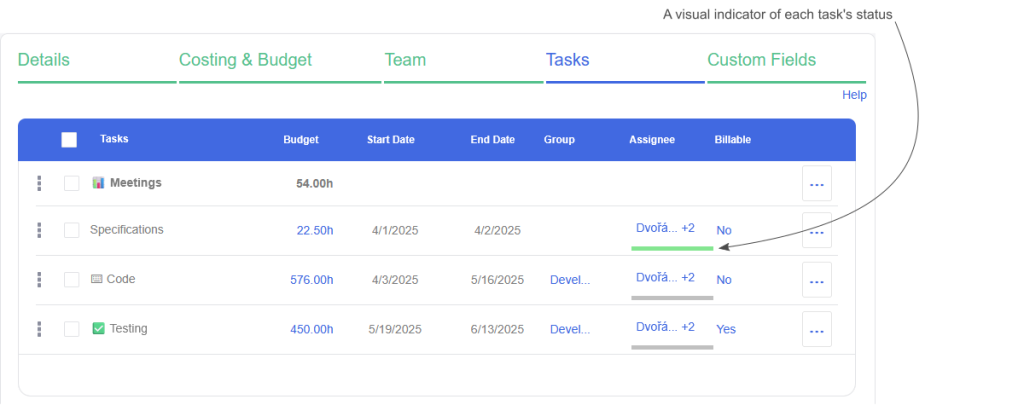
I’m pleased to announce that we’re expanding access to the Task Management features. This is now available to customers on a Pro plan.
Show/Hide of Task and Employee Assignments
In the previous version of Timesheet, we had a feature called Show/Hide Assignments but we didn’t carry it forward with this version. A number of you requested that we implement this feature because it helps make projects easier to manage and reduces the amount of information your employees need to wade through to track their time.
I’m pleased to announce that it’s now possible to show or hide task and employee assignments.
As shown in the following image, you can access the new feature in the Project view by choosing Hide from the row’s context menu. If the task is already hidden, the context menu will display the text ‘Unhide’.
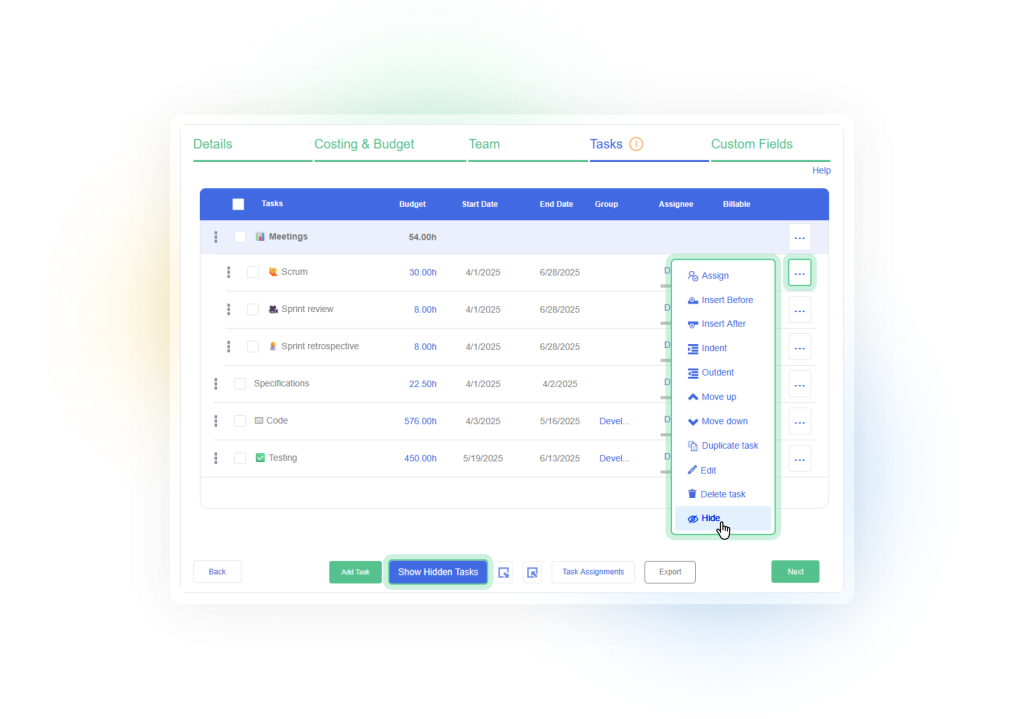
By default, the hidden items are removed from the list of tasks. If there are hidden tasks, a toggle button becomes visible at the bottom of the screen as shown in the previous image, allowing you to manage the items that are hidden.
If a task is not hidden, it’s also possible to hide or unhide specific employee assignments via the task’s assignment dialog. This is accomplished by right-clicking on an employee name as shown in the following image:
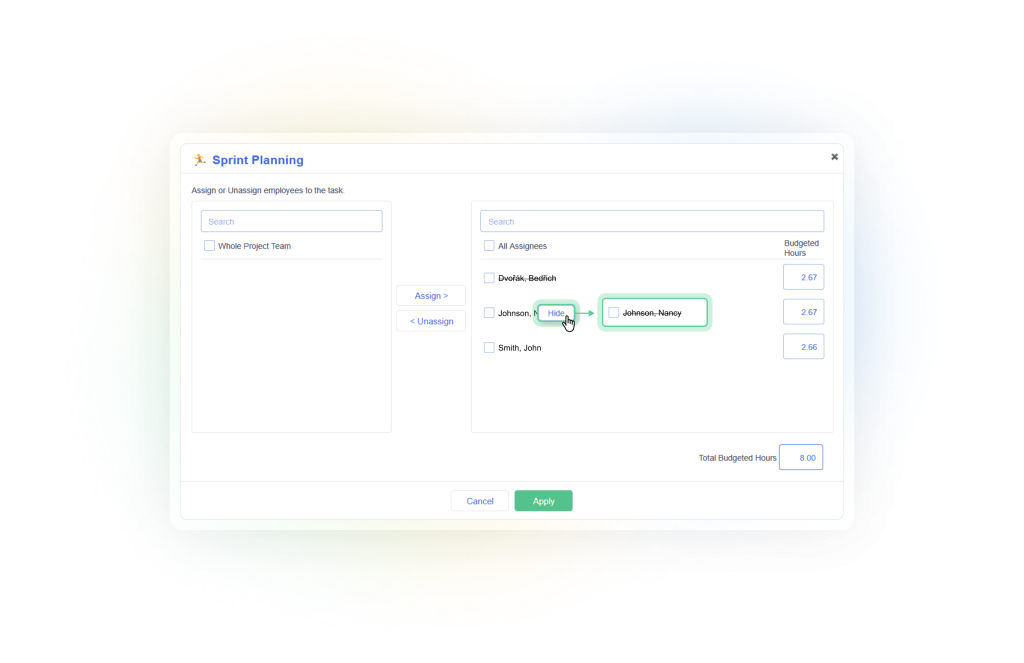
Note that hiding or unhiding a task will automatically do the same for all employee assignments on that task.
Also note that hiding a task, or a specific employee assignment on that task, will cause the assignment to be hidden from your employee(s) in the My Timesheet view.
API
With the newly added Show/Hide Assignment feature, the API has been adjusted to take this into account.
The POST and PUT assignment calls for both Task and Employee assignments now accept a Hide property. If the Hide property is not specified when creating the assignment, it will use the state of the parent item.
When doing an update on an employee assignment, the hide value will be ignored if the task is hidden.
In Conclusion
As always, we hope these Dovico Timesheet changes make things a little smoother, allowing you to get more done with less effort.
We value your input. If there is something you’d like to see in Timesheet, or something you feel could be improved, let us know: timesheet.dovico.com/contact
You can also reach out to our support team if you have any questions or concerns: timesheet.dovico.com/support
New to Dovico Timesheet?
These updates are part of our ongoing focus to help teams track time accurately, manage projects more easily, and stay focused on the work that matters.
If you’re not yet using Dovico Timesheet, check out our pricing page where you can sign up for a free 30-day trial to see if it’s right for you: timesheet.dovico.com/pricing
Gerard Gallant,
CIO of Dovico Software
Stay informed!
For more information on how and when regular maintenance is performed on Dovico servers, please check out our Maintenance Window Policy.
Please let us know if you are experiencing any issues with our software or have suggestions about how we can improve your experience by contacting our friendly support team.
Please reach out with any questions or feedback!